Digital Tachograph
Analysis
Analyse driver card and vehicle unit data online with TachoMagic. Our digital tachograph analysis software turns downloaded files into clear reports, possible infringement information and practical insights, helping transport managers understand driver activity and identify records that may need attention.
Upload tachograph files manually or use TachoMagic Remote Download Devices to collect driver card and vehicle data automatically. Remote downloads collect the files, while TachoMagic analyses the information and presents it through one connected online dashboard.
What Is Digital Tachograph Analysis?
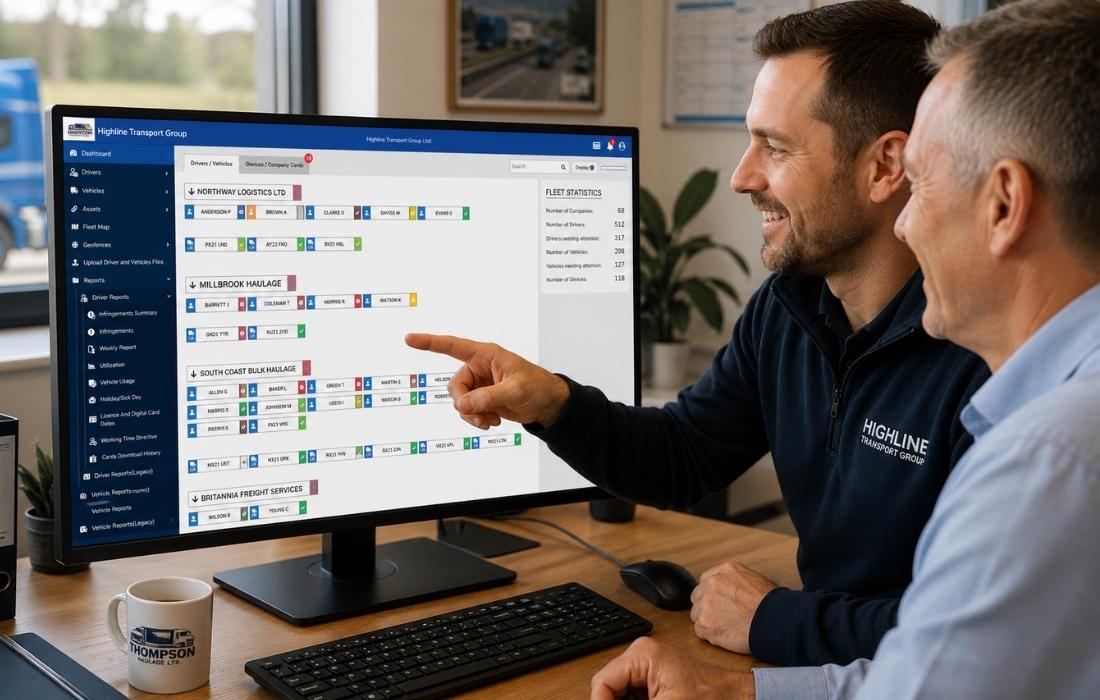
Digital tachograph analysis is the process of reviewing data downloaded from driver cards and vehicle units to understand driving time, breaks, rest periods, working time, possible infringements and other information relevant to tachograph compliance.
Tachograph files can be downloaded manually and uploaded to TachoMagic, or collected automatically through remote tachograph downloads . Once the files reach the platform, TachoMagic analyses the recorded driver and vehicle activity and presents the results through clear reports and an online digital tachograph dashboard.
Downloading your tachograph data is only the first step
Downloading driver card and vehicle unit files is essential, but the raw files themselves contain thousands of individual records that are difficult to interpret without specialist digital tachograph analysis software. Simply collecting the data does not tell you whether a driver has exceeded their driving hours, missed a required break or is developing a pattern of infringements.
Digital tachograph analysis transforms those files into clear reports, dashboards and alerts that help transport managers quickly understand what has happened, identify potential compliance issues and take action before small problems become costly ones. Rather than searching through raw tachograph data, you receive information that is easy to understand and act upon.
If you use TachoMagic Remote Downloads, your driver card and vehicle data is collected automatically in the background. TachoMagic then analyses that information, giving you an up-to-date view of your fleet without waiting for vehicles to return to base or manually uploading download files.
How Digital Tachograph Analysis Works
Tachograph analysis begins with data recorded on the driver card and vehicle unit. These files can be downloaded manually or collected through TachoMagic Remote Download Devices . TachoMagic then processes the files and turns the recorded activity into information that transport managers can review and act upon.
Download the Data
Driver card and vehicle unit files must first be downloaded from the tachograph. Operators can do this manually using suitable download equipment or automate the process with TADD Remote Download Devices.
Transfer the Files
Manually downloaded files can be uploaded securely to TachoMagic. Files collected through automatic tachograph downloads are transferred directly into the platform without waiting for the vehicle to return to base.
Analyse the Data
TachoMagic processes the recorded driver and vehicle activity against relevant drivers’ hours and working time rules. The online tachograph analysis software organises the information into clear reports and highlights records that may require attention.
Review and Act
Transport managers can review possible infringements, missing records, unknown driving, download status and activity trends. The findings can then support driver discussions, training and internal compliance processes.
Download Frequency Reminder
Tachograph data download rules require driver cards to be downloaded at least every 28 days and vehicle units (VUs) at least every 90 days.
Ready to Get Started?
Start analysing your tachograph data in minutes, book a personalised demonstration, or speak to our team if you have any questions.
What Does TachoMagic Analyse?
TachoMagic analyses driver card and vehicle unit data to give transport managers a clear view of driving activity, working time and possible compliance issues. Instead of reviewing raw tachograph files, you can quickly see the information that may require attention.
Driving Time
Review daily, weekly and fortnightly driving time, helping you identify when drivers may be approaching or exceeding permitted limits.
Breaks and Rest
Check whether required breaks and daily or weekly rest periods have been recorded correctly and highlight possible shortfalls.
Possible Infringements
Identify potential drivers' hours and tachograph infringements so they can be reviewed, explained and addressed promptly.
Working Time
Monitor working time records, periods of availability, other work and rest to support your wider compliance responsibilities.
Vehicle Activity
Review vehicle usage, mileage and tachograph activity, including periods that may require further investigation.
Download Records
See when driver cards and vehicle units were last downloaded, helping you identify missing or overdue tachograph data.
Understand Driving Time, Breaks and Rest at a Glance
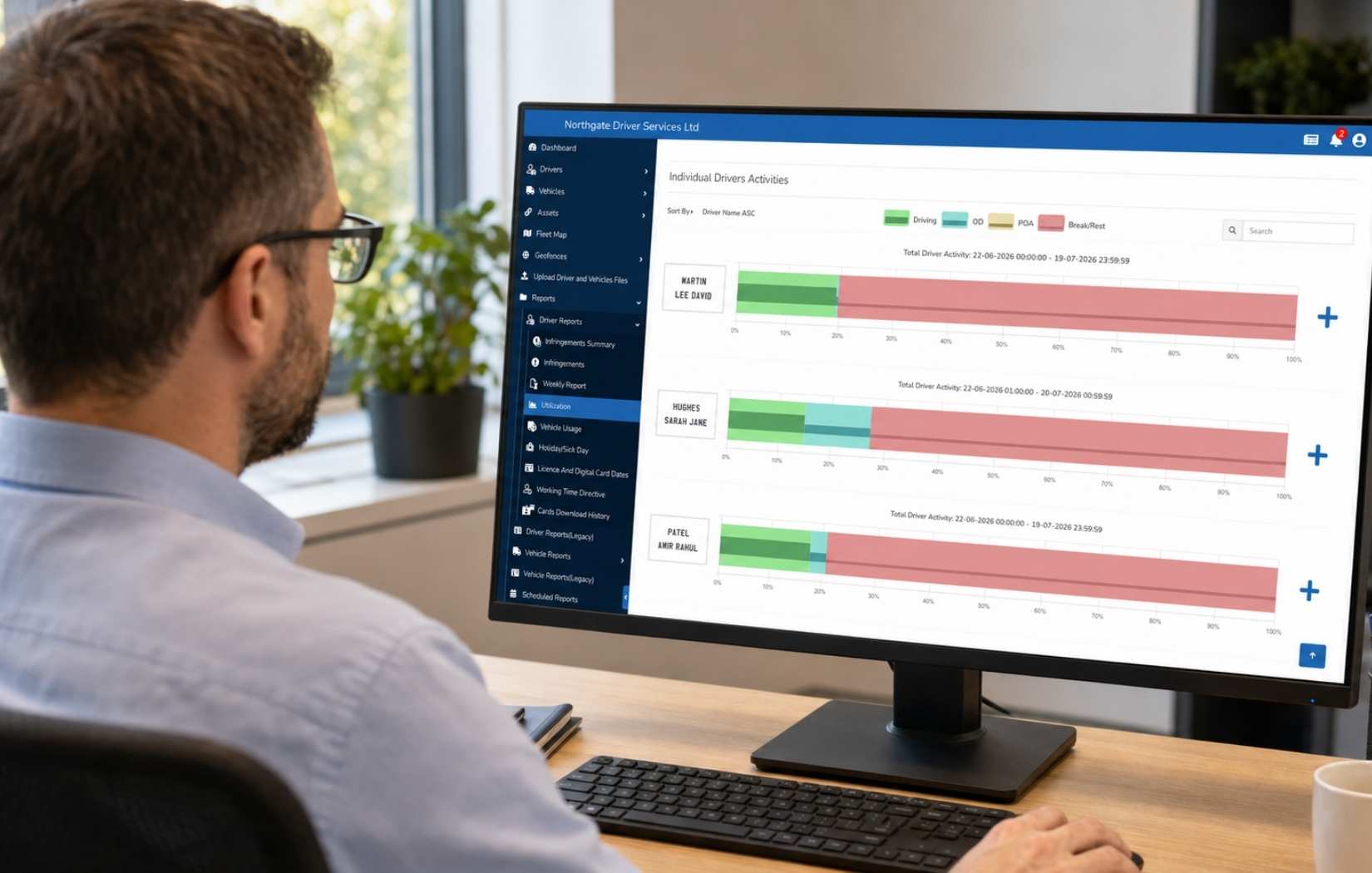
TachoMagic turns detailed tachograph records into clear drivers’ hours analysis, helping you understand how long each driver has been driving, when breaks were taken and whether the correct daily and weekly rest periods have been recorded.
Instead of manually calculating hours from raw driver card files, transport managers can use the online dashboard to review activity and quickly identify records that may need closer attention. This makes it easier to manage compliance consistently across individual drivers or an entire fleet.
The software can highlight possible issues such as excessive driving, insufficient breaks, reduced rest and other activity that may result in a drivers’ hours infringement. Each event can then be reviewed alongside the relevant tachograph data.
Possible compliance issues are highlighted so your team can investigate the relevant record.
Ready to Get Started?
Start analysing your tachograph data in minutes, book a personalised demonstration, or speak to our team if you have any questions.
Stay Ahead of Compliance Issues
Finding a drivers' hours infringement weeks after it happened gives you very little opportunity to prevent it. Effective digital tachograph analysis helps you identify potential issues quickly, understand why they occurred and take appropriate action before they become recurring problems.
Identify Patterns, Not Just Individual Events
One isolated infringement may simply be a genuine mistake, but repeated occurrences can indicate a wider issue. TachoMagic helps you spot recurring trends across your drivers, allowing managers to provide additional training, review schedules or investigate operational practices before they develop into more serious compliance concerns.
Make Better Operational Decisions
Rather than relying on raw tachograph files, transport managers receive clear information that helps them prioritise their workload. Whether reviewing drivers' hours, overdue downloads or unusual activity, analysis allows decisions to be based on accurate, up-to-date data instead of assumptions.
Reduce Administration Time
Reviewing tachograph data manually can be time-consuming, particularly as your fleet grows. Automated analysis reduces the time spent interpreting download files, allowing managers to focus on resolving issues instead of searching for them.
Always Analyse the Latest Data
When combined with TachoMagic Remote Downloads, your driver card and vehicle unit data can be collected automatically while vehicles are in use. This means your analysis is based on the latest available information without waiting for vehicles to return to base for manual downloads.
Digital tachograph analysis is most valuable when it becomes part of your everyday routine.
Instead of treating tachograph analysis as a monthly compliance task, regular reviews help operators understand what is happening across their fleet every day. Small issues can be identified earlier, trends become easier to recognise and compliance becomes significantly easier to manage.
Whether you manually upload your tachograph files or automate the process using TachoMagic Remote Downloads, analysing your data consistently gives you greater visibility, better decision-making and increased confidence that your fleet is operating compliantly.
Why Fleet Operators Choose TachoMagic
Digital tachograph analysis is only one part of effective fleet compliance. TachoMagic has been designed to help operators save time, reduce administration and manage everything from one cloud-based platform, giving you the flexibility to grow without changing systems.
Cloud-Based Platform
Access your tachograph analysis, reports and fleet information securely from anywhere with an internet connection. There is no software to install or maintain on individual computers.
Built Around Automation
Start by uploading tachograph files manually, then automate driver card and vehicle downloads whenever you're ready using TachoMagic Remote Download Devices. The same analysis platform works with both.
Everything In One Place
Digital tachograph analysis, Remote Downloads, GPS tracking, geofencing, walkaround checks and fleet reporting all work together within a single connected platform.
Developed In-House
Unlike many fleet systems, TachoMagic is developed entirely by our own team. This allows us to respond quickly to customer feedback and continually improve the platform with new features and enhancements.
Designed To Grow With You
Whether you operate one vehicle or hundreds, TachoMagic scales alongside your business. Add more vehicles, drivers or Remote Download Devices whenever you need them without changing software.
Straightforward Pricing
Pay only for the services you use. With flexible pricing for digital analysis and affordable Remote Downloads, you avoid expensive software licences while keeping your fleet compliant.
More than digital tachograph analysis
Many operators first discover TachoMagic because they need reliable digital tachograph analysis. They stay because the platform helps manage much more than tachograph data. From automatic Remote Downloads and GPS tracking to walkaround vehicle checks, geofencing and fleet reporting, everything works together in one place. That means less time switching between systems, less administration, and greater confidence that your fleet is operating safely and compliantly.
Ready to Get Started?
Start analysing your tachograph data in minutes, book a personalised demonstration, or speak to our team if you have any questions.
Manual Downloads or Remote Downloads?
TachoMagic analyses your tachograph data regardless of how it is collected. You can upload driver card and vehicle unit files manually, or automate the entire process using TachoMagic Remote Download Devices (TADDs). Both options provide the same powerful analysis, but the way the data reaches the system can make a significant difference to the amount of time you spend managing compliance.
| Manual Downloads | Remote Downloads (TADD) | |
|---|---|---|
| Collecting data | Driver cards and vehicle units must be downloaded manually. | Downloads happen automatically while vehicles are in use. |
| Vehicle availability | Vehicles usually need to return to base before downloads can take place. | No need to wait for vehicles to return. |
| Administration | Someone must remember to complete every download and upload the files. | Minimal administration once installed. |
| Keeping data up to date | Analysis only reflects the latest manual upload. | Analysis is continually updated as new data is received. |
| Fleet size | As small as possible. | Ideal for anyone wanting to automate. |
| Time to download | Around 10-20 minutes per vehicle. | Instantly done, automatically. |
Spend less time downloading, more time managing your fleet
Many operators begin by manually uploading their tachograph files, but quickly realise it takes up too much time - the time spent downloading driver cards and vehicle units quickly adds up. Missing a scheduled download can also leave you analysing outdated information, making it harder to identify potential compliance issues in time.
By adding TachoMagic Remote Download Devices, your driver card and vehicle data is collected automatically in the background and made available for analysis without any additional effort. Your transport managers always have access to the latest information, allowing them to focus on improving compliance rather than collecting data.
Learn about TachoMagic Remote DownloadsWho Uses TachoMagic Digital Tachograph Analysis?
Whether you operate a single vehicle or manage hundreds across multiple depots, TachoMagic helps simplify tachograph compliance. The platform scales with your business, making it suitable for new operators, growing fleets and established transport companies alike.
Haulage Companies
Monitor drivers' hours, review possible infringements, analyse vehicle activity and keep on top of compliance across your entire HGV fleet from one online platform.
Own Account Operators
Businesses operating vehicles as part of their own operations can manage tachograph compliance efficiently without needing complex systems or additional administration.
Bus & Coach Operators
Review drivers' hours, rest periods and tachograph activity across scheduled services, helping managers maintain high compliance standards.
Mixed Fleets
Analyse HGVs, vans that fall under tachograph legislation and other commercial vehicles together, giving you one complete view of your fleet.
New Operators
Build good compliance habits from the beginning. Start by manually uploading tachograph files, then move to automated Remote Downloads whenever you're ready.
Growing Fleets
As your fleet expands, reduce administration by combining powerful online tachograph analysis with automatic Remote Downloads, GPS tracking and fleet reporting.
Digital Tachograph Analysis Pricing
Pay only for the tachograph analysis you use, with no need to purchase an expensive software licence. Driver and vehicle analysis is charged only when there is new data available to download and analyse, while TachoMagic Remote Downloads can automate the entire collection process.
Digital Driver Analysis
per day
Turn driver card files into clear information about driving time, breaks, rest, working time and potential infringements.
- ✓ Drivers' hours analysis
- ✓ Break and rest monitoring
- ✓ Working time analysis
- ✓ Possible infringement reports
- ✓ Driver activity history
Digital Vehicle Analysis
per day
Analyse vehicle unit data and keep a clearer record of vehicle activity, mileage, downloads and possible issues requiring attention.
- ✓ Vehicle activity analysis
- ✓ Download history and monitoring
- ✓ Mileage and usage records
- ✓ Unknown driving information
- ✓ Online vehicle reports
TADD Subscription
per month
Automate your driver card and vehicle downloads while also gaining access to vehicle analysis, GPS tracking and valuable fleet management tools.
- ✓ Automatic driver card & vehicle unit downloads
- ✓ Digital Vehicle Analysis Saving up to £3.10 per month
- ✓ Live GPS tracking Worth £4.99 per month
- ✓ Route history
- ✓ Geofencing and SMS alerts
- ✓ Plug-and-play installation
Your First Download and Analysis Is Free
The first download and analysis for every new driver and vehicle is completely free, giving you the opportunity to see how TachoMagic works using your own tachograph data before you pay anything.
Ready to Get Started?
Start analysing your tachograph data in minutes, book a personalised demonstration, or speak to our team if you have any questions.
Digital Tachograph Analysis FAQs
Find answers to some of the most common questions about digital tachograph analysis, Remote Downloads and how TachoMagic helps operators manage fleet compliance.
What is digital tachograph analysis?
Digital tachograph analysis is the process of interpreting data downloaded from driver cards and vehicle units. Rather than viewing raw tachograph files, analysis software converts the information into reports showing drivers' hours, breaks, rest periods, working time, vehicle activity and potential infringements.
How often should tachograph data be downloaded?
Driver cards should normally be downloaded at least every 28 days, while vehicle units should normally be downloaded at least every 90 days. Many operators choose to automate this using TachoMagic Remote Download Devices so downloads happen automatically without waiting for vehicles to return to base.
Can I upload tachograph files manually?
Yes. TachoMagic supports manual uploads of both driver card and vehicle unit files. If you later decide to automate downloads using TachoMagic Remote Download Devices, your existing analysis platform remains exactly the same.
What are the benefits of Remote Downloads?
Remote Downloads automatically collect driver card and vehicle unit data while vehicles are in use. This reduces administration, helps prevent missed downloads and ensures your tachograph analysis is always based on the latest available data.
What can digital tachograph analysis tell me?
TachoMagic can analyse drivers' hours, breaks, daily and weekly rest, working time, vehicle activity, download history and potential infringements. It presents this information in clear reports that help transport managers monitor compliance more effectively.
Is TachoMagic suitable for small fleets?
Yes. Whether you operate a single vehicle or hundreds, TachoMagic scales with your business. Many smaller operators begin with manual uploads before introducing Remote Downloads as their fleet grows.
Do I need to install any software?
No. TachoMagic is a cloud-based platform that can be accessed securely through your web browser, allowing authorised users to review tachograph analysis and reports from almost anywhere with an internet connection.
How much does digital tachograph analysis cost?
Digital Driver Analysis costs 15p per driver per day, while Digital Vehicle Analysis costs 10p per vehicle per day. Charges only apply when there is data available to download and analyse. The first download and analysis for every new driver and vehicle is completely free.